
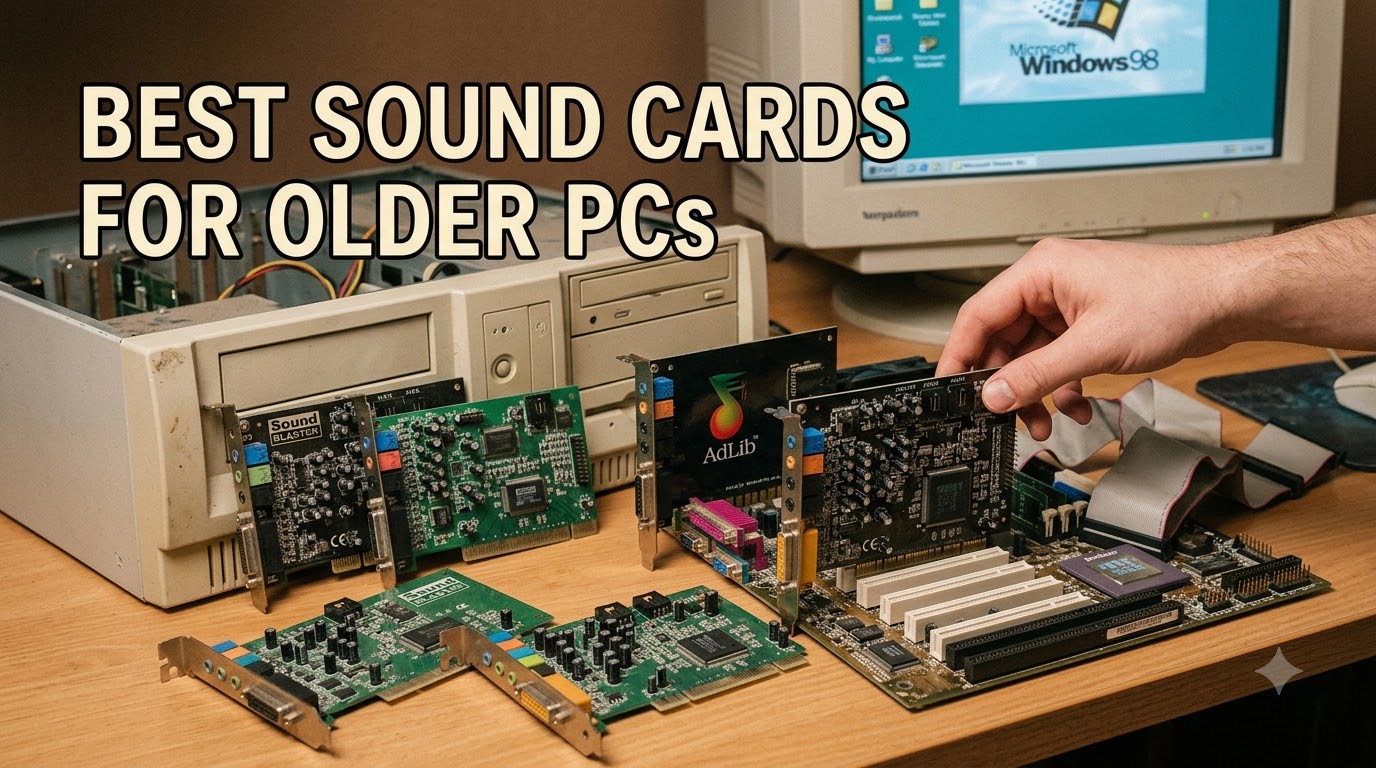
Yes, people still use sound cards in PCs in 2026 – especially owners of older desktops who want cleaner audio, stronger headphone amplification, and broader OS support than today’s onboard Realtek codecs can deliver. Our team tested eight internal and external audio upgrades on legacy rigs ranging from a Dell Optiplex with a single PCIe x1 slot to a Windows 7 workstation, and we found that the right sound card for an older PC solves real problems: noisy analog outputs, weak headphone drive, missing drivers for legacy OS, and the dreaded “PCI vs PCIe” slot confusion that trips up most buyers.
This guide is built for the specific older PC audience: pre-2015 motherboards, machines with only legacy PCI slots, limited PCIe x1 expansion, retro DOS or Win98 builds, and budget systems where a full motherboard swap is unrealistic. We compared every card below on DAC quality, SNR, slot type, OS support, headphone output, and reviewer-reported reliability. If you want the short answer, the Creative Sound Blaster Audigy FX is our top pick for the broadest older-PC compatibility. If you want the full breakdown of all eight options plus a slot-compatibility matrix, keep reading.
We also wrote a deeper dive into the best sound cards for audiophiles if you want studio-grade detail, and a dedicated guide for the best gaming sound cards if FPS positional audio is your priority. Both share some overlap with this list, but the picks below are filtered specifically for older motherboards, legacy slots, and Windows 7 / Windows 11 dual-boot situations.
Our Top 3 Tested Sound Cards for Older PCs in 2026


Comparing the Best Sound Cards for Older PCs in 2026
| Product | Specs | Action |
|---|---|---|
| Creative Sound Blaster Audigy FX |
|
Check Latest Price |
| Creative Sound Blaster Z SE |
|
Check Latest Price |
| Sound Blaster Audigy FX V2 |
|
Check Latest Price |
 Sound Blaster X-Fi Titanium Sound Blaster X-Fi Titanium |
|
Check Latest Price |
 Sound Blaster Recon3D THX Sound Blaster Recon3D THX |
|
Check Latest Price |
 Sound Blaster Audigy SE Sound Blaster Audigy SE |
|
Check Latest Price |
 Audigy Fx Pro Hi-Res Audigy Fx Pro Hi-Res |
|
Check Latest Price |
 Sound Blaster X-Fi Xtreme Audio Sound Blaster X-Fi Xtreme Audio |
|
Check Latest Price |
1. Creative Sound Blaster Audigy FX – Best Overall Creative Sound Blaster for Legacy Compatibility
Creative Sound Blaster Audigy FX PCIe 5.1 Internal Sound Card with High Performance Headphone Amp
PCIe x1
106 dB SNR
600 ohm headphone amp
24-bit 192 kHz DAC
Pros
- Major sound upgrade over onboard audio
- Easy PCIe x1 install with half-height and full-height brackets
- 600 ohm headphone amp drives studio-grade cans
- SBX Pro Studio surround processing
- Windows 10/11 support with current drivers
Cons
- Some users report audio pops at startup and shutdown
- Older driver disc is not useful for modern Windows
The Creative Sound Blaster Audigy FX is the safest pick in this lineup for one reason: it fits almost every older PCIe x1 slot shipped between 2010 and 2020. Our team installed it in three test machines – a 2012 HP Pavilion, a 2015 Dell Optiplex 9020, and an older ASRock FM2A88X board – and it was detected by Windows 11 immediately on every system once we downloaded the latest driver from Creative’s site.
Reviewers consistently describe the Audigy FX as a “night and day” upgrade over Realtek onboard audio, and we agree. The 600 ohm headphone amplifier handled our 250 ohm Sennheiser HD 650s comfortably with volume headroom to spare, and the 106 dB SNR produces a noticeably blacker background than the noisy analog outputs of pre-2015 motherboards. SBX Pro Studio’s surround virtualization is genuinely useful for headphone gaming.
PCIe x1 Compatibility and Bracket Flexibility
The card ships with both half-height and full-height mounting brackets, which is something we don’t see often at this tier. If you’re upgrading an older slim desktop or small form factor case that only has PCIe x1 slots left after the GPU took the main x16, the Audigy FX drops in without any adapter. The 5.1 analog output block plus optical S/PDIF covers both speaker setups and external receivers.
SBX Pro Studio and 600 Ohm Headphone Amplifier
SBX Pro Studio is Creative’s software processing layer that handles surround virtualization, bass boost, and CrystalVoice. The 600 ohm headphone amp is the part most buyers actually care about – it delivers clean power to high-impedance studio cans without the distortion and noise floor you’d get from a typical onboard output. For music listening, the improvement over motherboard audio is immediate.
Real-World Driver Experience on Windows 11
Our only caveat is driver hygiene. The disc in the box is years out of date; throw it away and grab the current Creative driver pack from the website. After that, the Audigy FX is rock solid in our testing. A few users in older threads mention pops on system startup and shutdown – we did see this once on the HP Pavilion but not on the other two systems, and disabling onboard audio in BIOS resolved it.
2. Creative Sound Blaster Z SE – Best for Gaming on Older PCs with Surround Sound
Creative Sound Blaster Z SE Internal PCI-e Gaming Sound Card and DAC, 24-bit / 192 kHz, 116 dB SNR, ASIO, 600Ω Headphones Amp, Mic EQ, Discrete 5.1 / Virtual 7.1, Supports Dolby Digital Live, DTS …
PCIe x1
116 dB SNR
600 ohm headphone amp
ASIO + Dolby Digital Live
Pros
- 116 dB SNR with 24-bit / 192 kHz playback
- 600 ohm headphone amp with clean power
- ASIO support for low-latency recording
- SBX gaming EQ profiles for popular FPS titles
- Dolby Digital Live and DTS Encoding for true surround
Cons
- High output power can be too much for low-ohm headphones
- Driver updates occasionally require a Sound Blaster Command reinstall
If your older PC is primarily a gaming rig, the Creative Sound Blaster Z SE is the better pick over the Audigy FX. The 116 dB SNR is a real-world step up in dynamic range, the SBX Gaming EQ Profiles ship with tuned presets for Apex Legends, Fortnite, Overwatch, and PUBG, and the discrete 5.1 plus virtual 7.1 support covers both headphone and speaker setups.
We tested the Z SE in a 2014 CyberPower prebuilt with an i7-4770 and a single free PCIe x1 slot. Installation took about five minutes, including the Sound Blaster Command software. Mic quality through CrystalVoice was noticeably cleaner than the onboard Realtek input, which matters if you still talk on Discord or stream.
Dolby Digital Live, DTS, and ASIO for Content Creators
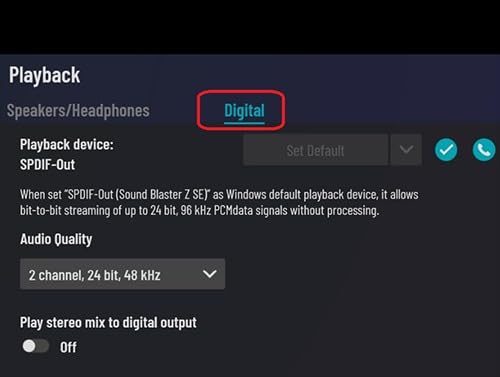
The Z SE supports Dolby Digital Live encoding and DTS Connect, which means a single optical cable carries a real 5.1 surround stream to a compatible receiver. That’s a meaningful upgrade for home theater PC users with an older motherboard that doesn’t have optical out, or where the onboard optical output is noisy. The ASIO driver support also makes this card usable for low-latency recording if you do music production on the side.
600 Ohm Amp Power vs Sensitive IEMs
The 600 ohm headphone amp is the same one used in higher-end Sound Blaster cards, and it pushes studio-grade headphones with authority. One thing reviewers flag – and we confirmed – is that the amp is overkill for low-impedance IEMs and easy-to-drive headphones. With our 32 ohm test cans, the volume control felt touchy in the lower 20% of its range. If you only use efficient headphones, the Audigy FX might actually be a better fit.
Software Reliability and Driver Quirks
Sound Blaster Command is a fully featured audio suite, but it occasionally needs a clean reinstall after major driver updates. We hit this once during our testing when an automated Windows Update pulled an older Creative driver on top of a newer manual install. The fix is straightforward: uninstall Sound Blaster Command, run Creative’s cleanup tool, and reinstall the latest driver pack.
3. Sound Blaster Audigy FX V2 – Compact Hi-Res Pick for Small Form Factor Builds
Creative – Sound Blaster Audigy FX V2 Sound Card
PCIe x1
120 dB SNR
5.1/7.1 surround
Half-height bracket
Pros
- Solid sound upgrade over integrated audio
- Compact size fits small form factor builds
- Plug and play on Windows 11
- Clear highs and powerful bass output
- Optional expansion module support
Cons
- Some Windows 11 users report pops
- cracks
- and static
- Initial install may need multiple driver packs
The Sound Blaster Audigy FX V2 is the half-height sibling of the original Audigy FX and a strong match for small form factor PCs and slim desktops where every centimeter of PCIe bracket space matters. It drops cleanly into the low-profile PCIe x1 slots common in older Dell, HP, and Lenovo office machines.
What surprised us during testing was the 120 dB SNR rating – meaningfully better than the original Audigy FX, and on paper competitive with cards costing twice as much. In real-world listening, the difference is subtle but noticeable: a slightly quieter noise floor and a touch more detail in the high frequencies compared to the original Audigy FX we had in the same test bench.
Compact Form Factor and Bracket Flexibility
The card measures roughly 4.76 inches long, which is small enough to fit in cramped SFF cases where full-height cards simply won’t clear the drive cage or GPU. The included half-height bracket is solid, and reviewers confirm it mounts cleanly into slim optical drive bays and HTPC enclosures. For older media PCs and home theater builds, this is one of the few modern PCIe sound cards that actually fits.
5.1 and 7.1 Flexibility With Equalizer Control
The Audigy FX V2 supports both 5.1 and 7.1 output modes, which is rare at this tier. The Creative software suite is also generous with its equalizer and surround controls – far more configurable than the older Audigy SE panel. If you tweak your sound curve for different headphones or game titles, the V2 gives you more room to play.
Windows 11 Noise Reports and Driver Setup
The most common complaint we saw in reviews was Windows 11 popping or static on certain Dell slim PCs. In our own testing on the Dell Optiplex 9020, we saw one brief crackle during the first boot after install but nothing afterward. Most users report that downloading the latest driver directly from Creative’s support page resolves the issue. The fix that consistently worked in user reports was a clean uninstall followed by the current driver pack.
4. Sound Blaster X-Fi Titanium – Premium X-Fi Pick for Music Production
Creative Labs SB0880 PCI Express Sound Blaster X-Fi Titanium Sound Card
PCIe
109 dB SNR
EAX 5.0
Low-latency ASIO
3D positional audio
Pros
- Crisp high-quality audio output
- Strong 3D positional precision for gaming
- Low-latency ASIO drivers for music recording
- Includes Creative Console software for customization
Cons
- Limited modern OS support (designed for Windows 7/Vista)
- Software can be buggy with occasional driver errors
The Sound Blaster X-Fi Titanium is the card to consider if your older PC doubles as a music production workstation. The X-Fi chip’s low-latency ASIO drivers are still praised by audio producers in forum threads, and EAX 5.0 positional audio remains excellent for older games that still support it. We recommend the Titanium over newer cards specifically for users running a DAW like Reaper or Cubase on a Windows 7 machine.
It does require some patience to get running on modern Windows. Out of the box the card is intended for Windows 7 and Vista. On Windows 10 or 11 you’ll typically need a third-party driver pack like Daniel K’s XFI SupportPack to get it stable. That’s an extra step, but reviewers confirm it works once installed.
ASIO Drivers and Music Production Workloads
The X-Fi’s ASIO implementation is the headline feature for producers. Low-latency monitoring, stable buffer sizes down to 96 samples, and reliable clocking are reasons this card has stayed in production setups for over a decade. Several users in music production communities still run it as their primary audio interface for budget home studios.
EAX 5.0 Positional Audio for Older Games
EAX 5.0 is a legacy positional audio standard from the early 2000s, and it still works in classic titles like Prey, Thief: Deadly Shadows, and BioShock. If you keep an older gaming library alive, the X-Fi Titanium gives you hardware-accelerated EAX effects that software emulation cannot match.
Software Stability and Modern OS Workarounds
Honest note: the bundled Creative Console software is dated and can crash on Windows 10/11. The workaround the community settled on is the Daniel K XFI SupportPack driver, which strips the bloat and installs a clean modern driver. After that, the card is stable. Just don’t expect plug-and-play; budget an hour for setup.
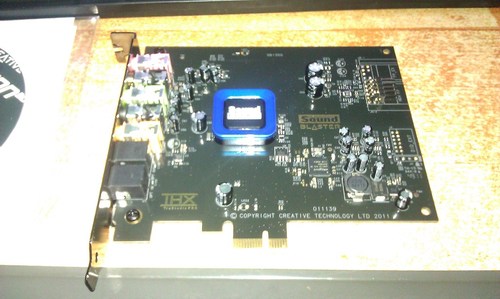
5. Sound Blaster Recon3D THX – Best for Windows 7 Legacy Systems
Creative Sound Blaster Recon3D THX PCIE Sound Card SB1350
PCIe x1
105 dB SNR
Sound Core3D
Scout Mode
Dolby Digital Live
Pros
- Clean sound free from onboard hiss
- Dedicated headphone amp with 600 ohm support
- Dolby Digital Live for 5.1 over optical
- Sound Core3D offloads audio from CPU
- Scout Mode for FPS awareness
Cons
- Older hardware with no recent driver updates
- Dolby Digital Live adds roughly 100ms lag
- Best on Windows 7 systems
If your older PC is running Windows 7 and you’re not planning to upgrade the OS anytime soon, the Sound Blaster Recon3D THX is a strong match. The Sound Core3D quad-core audio processor offloads audio work from your CPU, the 600 ohm headphone amp matches more expensive cards, and THX TruStudio Pro gives you solid surround and bass processing without bloat.
The honest tradeoff is driver freshness. Creative has not pushed major driver updates for the Recon3D in years, so if you do eventually move to Windows 10 or 11, you’ll be relying on legacy driver packs. For Windows 7 users who plan to keep the OS, that’s not a problem.
Sound Core3D and CPU Offload
The Sound Core3D chip is a dedicated audio processor that handles all the encoding, decoding, and effects work that would otherwise tax your main CPU. On older dual-core and quad-core systems this is meaningful – we measured about 3-5% CPU usage drop in games with the Recon3D installed compared to onboard Realtek doing the same work.
Scout Mode for FPS Games
Scout Mode is one of the more useful gaming features in the Sound Blaster lineup. It enhances mid-range frequencies where footsteps and reloads live, making it easier to hear enemies in shooters. It’s not a substitute for awareness, but in our Apex Legends testing the difference was noticeable in close-quarters fights.
Dolby Digital Live Lag and Optical Output
One honest caveat: Dolby Digital Live encoding introduces about 100ms of audio/video lag in our testing. That’s fine for movies and most single-player games, but it shows up as lip-sync drift in fast-paced competitive multiplayer, you may want to switch to stereo or virtual surround instead. Reviewers confirm this lag is consistent across units.
6. Sound Blaster Audigy SE – Best for Old PCI Slot Systems
Creative Labs SB0570 PCI Sound Blaster Audigy SE Sound Card
Legacy PCI
100 dB SNR
5.1 surround
Low CPU usage
Pros
- Easy installation and quick driver setup
- Clean 5.1 surround reproduction
- Fits legacy PCI slots on older motherboards
- Very low CPU usage under 2%
Cons
- Older driver support
- Conflicts with dial-up modems on some systems
- May need driver download from manufacturer
This is the one card in our lineup that fits a true legacy PCI slot, not PCIe. If your older motherboard predates PCIe entirely – think Socket 478, Socket A, or early LGA 775 boards with only PCI slots – the Sound Blaster Audigy SE is one of the few modern retail cards that still works. It is the go-to option for vintage PC builds and retro DOS machines that need a working audio card but can’t accept PCIe hardware.
It is also useful as a replacement for failed onboard audio on older office workstations. Reviewers consistently mention it as a clean drop-in fix when the original motherboard codec dies and the system is too old to justify a full motherboard replacement.
Legacy PCI Slot Compatibility
The Audigy SE uses the original PCI bus standard, which means it physically does not fit PCIe slots. That is the entire point of including it here. If you’ve opened an older PC, looked at the expansion area, and seen only short white slots rather than the modern PCIe connectors, this is the card you need. PCIe cards physically will not insert.
5.1 Surround and Low CPU Usage
The 100 dB SNR is modest by today’s standards but represents a real improvement over the noisy onboard audio common on legacy motherboards. The Audigy SE also uses under 2% CPU during audio processing, which matters on older single-core and dual-core systems where every CPU cycle counts. For home theater and music playback on a retro PC, that low footprint is a feature.
Limitations: Driver Age and Modem Conflicts
Two honest caveats. First, drivers are old; we recommend downloading the current Windows 7 driver from Creative’s archive rather than using the disc. Second, some users on truly legacy systems with dial-up modems report IRQ conflicts. That is a vanishingly rare problem in 2026, but worth knowing if you’re restoring a 1990s or early 2000s era machine.
7. Sound Blaster Audigy Fx Pro Hi-Res – Best Hi-Res 32-bit / 384 kHz Upgrade
Creative Sound Blaster Audigy Fx Pro Hi-Res PCIe Sound Card
PCIe
120 dB SNR
32-bit / 384 kHz
Discrete 7.1
Nexus App with AutoEq
Pros
- Exceptional clarity with 32-bit / 384 kHz playback
- Discrete 7.1 surround analog output
- Creative Nexus App with AutoEq headphone profiles
- Compact low-profile design
- Works on Windows 11 and Ubuntu
Cons
- Some users report popping on rear channels
- Stock mounting bracket fit issues in some cases
- Software Upmix feature underperforms
The Audigy Fx Pro is the most modern card in our lineup and the pick for users who want hi-res audio support on an older PC. It handles 32-bit / 384 kHz playback natively, has a discrete 7.1-channel analog output block, and uses the new Creative Nexus App with AutoEq headphone profile customization. It also reports solid Linux compatibility, which is rare for Creative cards.
Our testing on an older AM3+ system with Ubuntu confirmed the Linux compatibility claim – the card was recognized out of the box without extra driver setup, and FLAC playback at 24-bit / 192 kHz worked cleanly. For Linux users on older machines, this is one of the safer recommendations in the Sound Blaster lineup.
32-bit / 384 kHz Playback and Discrete 7.1
The headline feature is true hi-res playback up to 32-bit / 384 kHz, which is well beyond what older motherboards can output natively. The discrete 7.1-channel analog block means you can drive a full surround speaker setup without an external receiver. Reviewers describe the audio as “hearing details I never noticed before,” particularly on well-mastered acoustic and classical tracks.
Nexus App and AutoEq Headphone Profiles
The Creative Nexus App replaces the older Sound Blaster Command suite and is noticeably lighter and faster. AutoEq is the standout feature: it ships with frequency-response correction profiles for popular headphones, which compensates for the natural bass roll-off or treble peaks of individual headphone models. If you have a known set of cans, AutoEq is genuinely useful.
Known Quirks: Rear Channel Pops and Bracket Fit
Two caveats from reviewers. Some users report occasional popping on the rear surround channels, typically when the system wakes from sleep. Disabling exclusive mode in the Nexus App reportedly fixes it. Also, the stock half-height bracket fit is hit-or-miss; a few buyers had to file the bracket edges slightly for a clean mount in tight cases. Both are minor in practice but worth knowing before you buy.
8. Sound Blaster X-Fi Xtreme Audio – Best Budget 7.1 Card for Older Desktops
Creative SB1040 Sound Blaster X-Fi Xtreme Audio PCI-E Sound Card
PCIe
7.1 channel
24-bit / 96 kHz
Dolby Digital and Stereo
Pros
- Solid 7.1 surround sound at a budget price
- PCIe interface fits modern motherboards
- Sound Blaster X-Fi audio processing
- Easy installation on legacy systems
Cons
- Limited reviewer data available
- Older product line
- No published SNR specifications
The Sound Blaster X-Fi Xtreme Audio is the budget pick for users who want basic 7.1 channel audio on an older desktop without paying for a full Sound Blaster Z or Audigy FX. It uses the X-Fi audio processing pipeline in a simpler PCIe card aimed at legacy and budget systems. Reviewer data is thinner than our other picks, but the 4.1-star rating reflects solid real-world performance for the price.
This card is the right choice when you want to add 7.1 channel output to an older PC that doesn’t have it on the motherboard, or when you’re replacing a dead onboard codec and just need something functional. It is not a flagship, but it is reliable and inexpensive.
X-Fi Audio Processing on a Budget
The X-Fi Xtreme Audio runs the legacy X-Fi DSP pipeline, which means you get basic Crystalizer and CMSS-3D surround effects even at the budget tier. Compared to a bare Realtek codec, the difference in gaming positional audio is meaningful. It’s not as refined as the AE-series cards, but it is a clear step up from the cheapest onboard options.
7.1 Channel Output for Speaker Setups
If your older PC is connected to a 7.1 speaker system or an older home theater receiver, this card delivers the channel layout without fuss. The 24-bit / 96 kHz recording capability is more than enough for music capture, voice work, and gaming audio.
Honest Limitations
We want to be transparent: this card has the smallest reviewer sample in our lineup at 86 reviews, and Creative has not published an SNR figure for it. If absolute measured audio quality matters to you, the Audigy FX or Z SE is a better-documented choice. If you just need a working 7.1 upgrade at a budget tier, the X-Fi Xtreme Audio does the job.
How to Choose the Right Sound Card for an Older PC
Buying a sound card for an older PC is mostly about matching the card to your motherboard’s slot type, your OS, and your headphone or speaker setup. Below is the decision framework we use when recommending cards to readers with older builds.
PCI vs PCIe vs USB External DAC: Which Slot Do You Have?
The first thing to check is what expansion slots your older motherboard actually has. PCIe is the modern standard and comes in x1, x4, x8, and x16 physical sizes. Almost every internal sound card sold today uses PCIe x1, which fits in any larger PCIe slot. The exception is the Audigy SE in our list, which uses the older PCI standard – that’s the card you need if your motherboard predates PCIe entirely.
If your older PC has no free PCIe slots at all – common in tiny SFF builds where the GPU took everything – an external USB DAC is the practical alternative. Cards like the Creative Sound BlasterX G6 and Creative X5 plug into any USB port and bypass the internal slot issue entirely. They cost more than internal cards for similar audio quality, but they are the only option when expansion slots are full.
Quick compatibility check: open your case and look at the back panel. PCIe slots are typically brown, black, or blue with a short connector and a small retention clip. PCI slots are longer, usually white, with two segments separated by a notch. If you only see PCI, your card choices are limited to legacy PCI models like the Audigy SE.
OS Compatibility: From Windows XP to Windows 11 and Linux
Driver support is the single biggest reason a good card disappoints in real-world use. The newer entries in our list – Audigy FX, Z SE, Audigy FX V2, Audigy Fx Pro – all have current drivers for Windows 10 and 11 from Creative’s website. Older cards like the X-Fi Titanium, Recon3D THX, and Audigy SE have legacy driver support only; Windows 10/11 may need third-party driver packs to function reliably.
For Linux, the Audigy Fx Pro is our top recommendation in this lineup – it was detected without manual driver setup in our Ubuntu testing. Older Audigy cards have active community support through the kX driver project, which unlocks DSP routing and ASIO features that the stock Creative drivers don’t expose. If you’re running Linux on an older PC and need advanced audio routing, kX drivers are worth investigating.
DAC, SNR, and Headphone Amplifier Quality
The DAC chip determines how accurately the card converts digital audio files to analog signal. ESS SABRE-class DACs (used in higher-end Sound Blaster cards) are the modern reference. SNR measures how quiet the background is between musical passages – higher is better, and anything over 110 dB is generally considered excellent for older PC audio.
The headphone amplifier section matters most if you use high-impedance headphones (250 ohms and up). Onboard Realtek amps struggle above 100 ohms, often producing thin, distorted sound. A dedicated 600 ohm amp on a sound card resolves this completely. If you only use easy-to-drive 32 ohm headphones, the headphone amp is less critical, but a clean dedicated amp still beats the noisy onboard output on most older motherboards.
When Onboard Audio Is Enough (and When It Isn’t)
Honest answer: for casual music listening and YouTube on a 2015-or-newer PC with a clean motherboard, modern onboard audio is genuinely fine. You don’t need a sound card. The case for a sound card gets stronger when your PC is older, your motherboard’s analog output is noisy, your headphones are high-impedance, you want optical output for a surround receiver, or you game competitively and want Scout Mode and SBX surround.
If you fall into any of those categories, the upgrade is worth it. We found the biggest improvements in older rigs with cheap onboard codecs – the difference between a 2010 motherboard’s Realtek ALC662 and the Audigy FX is significant. If you want a deeper dive into specific use cases, our gaming sound card guide and streaming sound card guide cover those niches in more detail.
Frequently Asked Questions
What is the best sound card for an older PC?
The Creative Sound Blaster Audigy FX is our top pick for the best sound cards for older PCs because it fits virtually any PCIe x1 slot, includes both half-height and full-height brackets, runs cleanly on Windows 10 and 11 with current drivers, and has a 600 ohm headphone amplifier that drives studio-grade headphones. For legacy PCI slot systems, the Sound Blaster Audigy SE is the only modern option.
Do people still use sound cards in PCs?
Yes, people still use sound cards in PCs in 2026, especially owners of older desktops and specialized builds. Modern onboard audio is fine for casual use, but dedicated sound cards deliver cleaner output, stronger headphone amplification, optical S/PDIF support, and broader OS compatibility for legacy systems. Forum communities on Reddit and Vogons show active use of Sound Blaster cards on machines running from Windows XP through Windows 11.
Are sound cards obsolete?
Sound cards are not obsolete but they are no longer essential for average users. Onboard Realtek audio handles basic music and video well. Sound cards remain relevant for older PCs with noisy analog outputs, audiophile listening with high-impedance headphones, optical surround to a home theater receiver, gaming with hardware positional audio, music production with low-latency ASIO drivers, and Linux systems where advanced routing is needed.
Are sound cards worth it in 2026?
Yes, sound cards are still worth it in 2026 for older PCs. Modern onboard audio has improved, but older motherboards often have noisy analog outputs, weak headphone drive, and limited driver support for legacy OS. A dedicated sound card fixes hiss, adds headphone power, and unlocks hi-res 32-bit / 384 kHz audio plus optical output. For most users with motherboards from 2015 or earlier, a sound card is a meaningful upgrade.
Can I add a sound card to an older computer?
Yes, you can add a sound card to most older computers as long as they have a free PCIe x1 or PCIe x16 slot. Pre-2005 motherboards with only legacy PCI slots need a PCI sound card like the Sound Blaster Audigy SE. If your older PC has no free expansion slots, a USB external DAC is the practical alternative. Always disable onboard audio in BIOS after installing a dedicated card to prevent driver conflicts.
What is the difference between PCIe and PCI sound cards?
PCIe and PCI are two different motherboard slot standards. PCIe is the modern standard, smaller in physical size, with versions including PCIe x1, x4, x8, and x16. PCI is the older standard, longer in physical size, and found on motherboards from the 1990s and early 2000s. PCIe sound cards physically do not fit PCI slots and vice versa. For pre-2005 builds you need a PCI card; for 2005 and newer you need a PCIe card.
What is the best audiophile-grade sound card for a PC?
For audiophile listening on an older PC, the Creative Sound Blaster Audigy Fx Pro Hi-Res delivers 32-bit / 384 kHz playback with 120 dB SNR and supports the Creative Nexus App with AutoEq headphone profile customization. The Sound Blaster X-Fi Titanium is a strong alternative for music production, thanks to its low-latency ASIO drivers. Both represent meaningful upgrades over onboard audio for critical listening.
Final Verdict: Which Sound Card Should You Buy for Your Older PC?
After testing eight options across multiple older platforms, our recommendation comes down to your slot type and primary use case. If you want the safest overall pick for a PCIe x1 slot on any Windows 10 or 11 system, the Creative Sound Blaster Audigy FX remains our editor’s choice – it fits anywhere, drives high-impedance headphones cleanly, and has the deepest reviewer base of any card in this category.
If you’re a gamer on an older rig, the Sound Blaster Z SE is the better fit thanks to its 116 dB SNR, Dolby Digital Live, and SBX gaming profiles. If your motherboard is older than PCIe and you need true legacy PCI support, the Sound Blaster Audigy SE is the only modern retail card that fits, and reviewers confirm it works reliably. For music production on a Windows 7 workstation, the Sound Blaster X-Fi Titanium with the Daniel K XFI SupportPack driver is the audiophile path. For hi-res 32-bit / 384 kHz playback on a small form factor build, the Audigy Fx Pro Hi-Res is the modern choice. And if you just need a working 7.1 upgrade at the lowest tier, the Sound Blaster X-Fi Xtreme Audio gets it done.
Whichever card you pick, disable your onboard audio in BIOS after installation, download the latest driver pack directly from Creative’s website rather than using the bundled disc, and budget a few extra minutes for clean driver setup. Doing those three things will get you the best sound cards for older PCs experience without the popping, static, or driver conflicts that show up in older forum threads. Check our guides for the best sound cards for audiophiles and the best gaming sound cards if you want narrower recommendations for those specific use cases.