
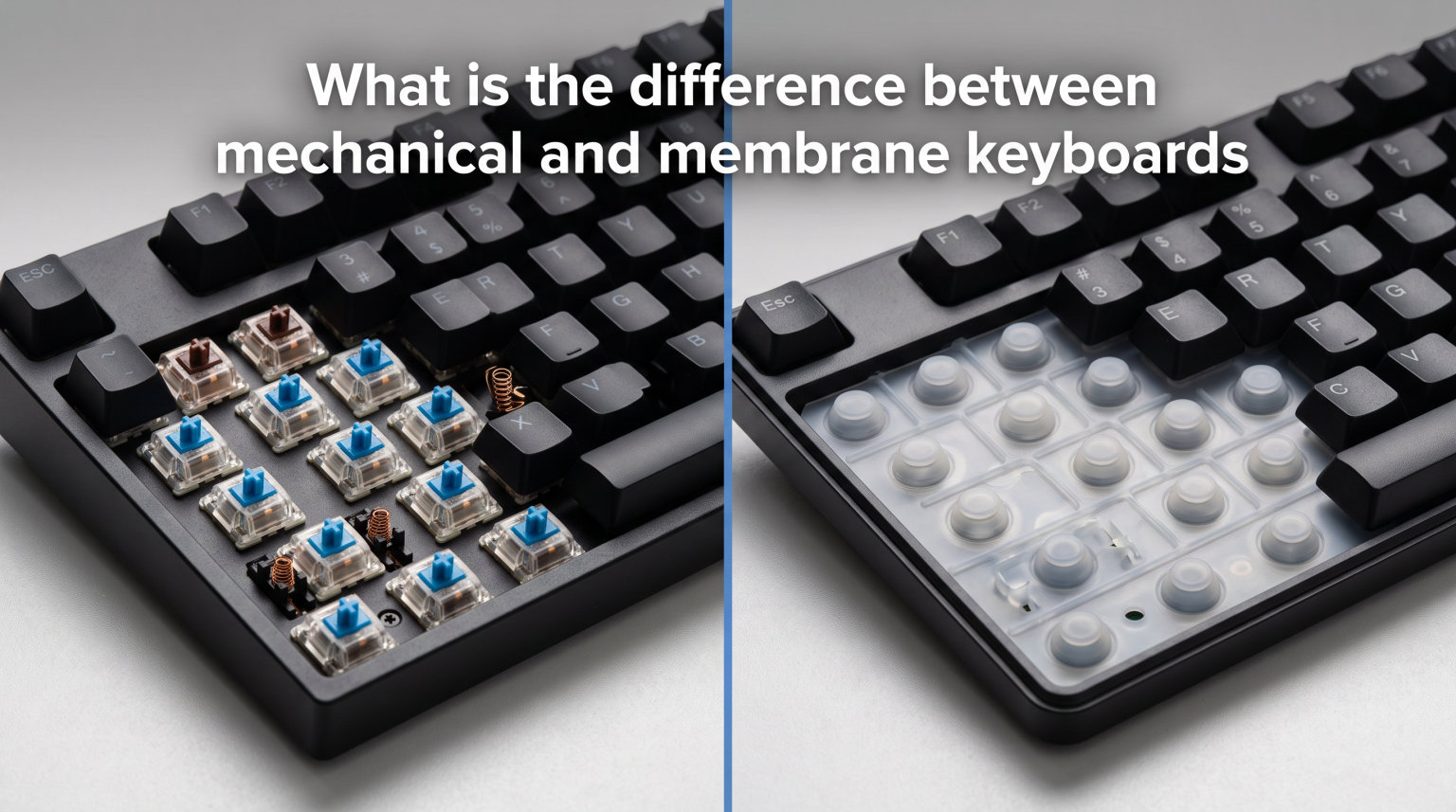
If you have ever typed on a keyboard and wondered why some feel crisp and responsive while others feel soft and squishy, the answer comes down to what is underneath each key. The difference between mechanical and membrane keyboards is the single most important factor in how a keyboard feels, sounds, and lasts over time. One uses individual physical switches with metal contacts and springs, while the other relies on a flexible rubber dome sheet that registers keypresses through pressure.
I have spent years typing on both types across gaming setups, office desks, and travel bags. After testing dozens of keyboards and reading through countless forum threads from real users on Reddit communities like r/keyboards and r/buildapc, I can tell you that neither type is universally better. The right choice depends entirely on your typing style, environment, budget, and what you do with your computer.
In this guide, we will break down exactly how each keyboard technology works, compare them across every category that matters, and help you figure out which type fits your needs. We will also cover scissor switches and hybrid keyboards that bridge the gap between the two. By the end, you will have a clear understanding of the difference between mechanical and membrane keyboards and know exactly which one to choose.
What Is a Mechanical Keyboard?
A mechanical keyboard uses a separate, self-contained physical switch under every single key. Each switch has its own spring-loaded stem that moves down when you press a key, pushing copper contacts together to complete an electrical circuit and register the keystroke. This design has been around since the 1980s and remains the gold standard for typing feel and durability.
The most well-known switch manufacturer is Cherry, whose Cherry MX switches set the industry standard decades ago. Today, dozens of companies make compatible switches, but the core design remains the same: a housing, a metal spring, a stem that determines the feel, and two copper contacts that close the circuit when pressed. Because each key has its own dedicated switch, the actuation is precise and consistent.
What makes mechanical keyboards special is that you can actually feel the point where the key registers. You do not have to press the key all the way down to the bottom. Once those copper contacts touch, the keystroke is registered. This means you can type faster with less finger fatigue because you are not bottoming out on every single press. The tactile feedback tells your brain that the key has actuated before the key hits the frame.
What Is a Membrane Keyboard?
A membrane keyboard uses a single flexible rubber dome sheet that sits on top of a circuit board. When you press a key, it pushes down on a rubber dome, which flexes and forces a conductive pad on the underside of the dome against the circuit traces below. This completes the circuit and registers your keystroke. Think of it like pressing bubble wrap, except each bubble completes an electrical connection.
This design is simpler and cheaper to manufacture than individual mechanical switches. Instead of 87 to 104 separate switch units, a membrane keyboard uses a single molded rubber sheet with a dome for each key position. This is why most budget keyboards, office keyboards, and laptop peripherals use membrane technology. The rubber dome provides the resistance and return force, so there are no metal springs involved.
The trade-off is that membrane keyboards require you to press the key all the way down until the rubber dome makes contact with the circuit layer. You have to bottom out on every keystroke to guarantee registration. There is no tactile bump or audible click that tells you the key has actuated. This is why people describe membrane keyboards as feeling mushy or squishy compared to the crisp, defined feel of a mechanical switch. The rubber also degrades over time, which means the feel changes the longer you use the keyboard.
Types of Mechanical Switches Explained
One of the biggest advantages of mechanical keyboards is the variety of switch types available. Each switch type offers a completely different typing experience, and you can choose the one that matches your preference. The three main categories are linear, tactile, and clicky switches.
Linear switches are the smoothest option. They move straight down with no bump or click along the way. The keystroke feels consistent from the top of the press to the bottom. Cherry MX Red switches are the most popular linear option, and they are widely recommended for gaming because the smooth travel allows for fast, repeated presses. Linear switches typically require around 45 grams of actuation force, which is relatively light.
Tactile switches add a noticeable bump partway through the keypress. This bump tells your finger that the key has actuated, even though there is no audible click sound. Cherry MX Brown switches are the go-to tactile option for many typists and programmers. The tactile bump makes it easier to avoid bottoming out, which can reduce finger strain during long typing sessions. Tactile switches usually require around 50 to 55 grams of force.
Clicky switches combine the tactile bump with an audible click mechanism inside the switch housing. When you pass the actuation point, a small click leaf snaps into place, producing a distinct clicky sound. Cherry MX Blue switches are the classic clicky option. Many typists love clicky switches because the combination of tactile and auditory feedback creates a satisfying typing rhythm. However, the sound can be loud enough to bother people around you in shared spaces.
Beyond these three main categories, there are hundreds of switch variations from brands like Gateron, Kailh, and Durock. You can find switches with different spring weights, travel distances, and sound profiles. This level of variety simply does not exist with membrane keyboards, where the rubber dome feel is essentially fixed.
Key Differences Between Mechanical and Membrane Keyboards
Now let us get into the core differences that matter most when comparing these two keyboard technologies side by side. Here is a breakdown across every important category:
Typing feel: Mechanical keyboards offer a crisp, defined keystroke with clear actuation feedback. Membrane keyboards feel softer, with a mushy or squishy sensation because you are compressing a rubber dome.
Durability: Mechanical switches are rated for 50 to 100 million keystrokes per key. Membrane rubber domes typically last 5 to 15 million keystrokes before the rubber starts to degrade and feel inconsistent.
Noise level: Membrane keyboards are naturally quiet because the rubber absorbs sound. Mechanical keyboards can be loud, especially with clicky switches, though linear switches are quieter and O-rings can dampen the sound.
Cost: Membrane keyboards generally cost less because the rubber dome sheet is cheap to produce. Mechanical keyboards cost more due to the individual switches, but prices have come down significantly in recent years.
Customization: Mechanical keyboards allow you to swap keycaps, change switches on hot-swappable boards, and even modify the internal foam and stabilizers. Membrane keyboards offer almost no customization options.
Consistency: Each mechanical key has its own switch, so every key feels the same. Membrane rubber domes can vary slightly in feel, and some keys may register differently as the rubber wears unevenly.
N-key rollover: Most mechanical keyboards support full n-key rollover, meaning every key press is registered simultaneously. Many membrane keyboards have limited rollover, which can cause missed inputs during fast typing or gaming.
Repairability: Mechanical keyboards can often be repaired by replacing individual switches. Membrane keyboards usually require replacing the entire rubber dome sheet, which is rarely practical.
These differences explain why the mechanical versus membrane debate is so passionate. Each technology has genuine strengths and weaknesses that affect your daily computing experience.
Typing Feel: How They Compare
Typing feel is where the difference between mechanical and membrane keyboards becomes most obvious the moment you start using them. When I first switched from a membrane keyboard to a mechanical one, the change was immediately noticeable. Every keypress on a mechanical board has a defined starting point, a clear actuation moment, and a springy return that pushes your finger back up.
Membrane keyboards feel fundamentally different. When you press a key on a membrane board, you are compressing a rubber dome. The resistance starts soft and increases as the dome collapses. There is no clear actuation point because the key registers only when the dome fully compresses and touches the circuit layer. This creates that characteristic mushy feeling that many users describe. You also have to press the key all the way down to guarantee it registers, which means you are bottoming out on every keystroke.
Forum users on Reddit capture this difference well. Many describe membrane keyboards as feeling like typing on a sponge, while mechanical keyboards feel like typing on individual, purposeful buttons. However, some users actually prefer the softer feel of membrane keyboards for casual use. It really comes down to personal preference and what feels natural to your fingers over extended typing sessions.
One important point that often gets overlooked: mechanical keyboards maintain their typing feel much longer than membrane keyboards. A rubber dome softens and loses its resistance after months or years of use. A mechanical switch feels essentially the same after 5 million keystrokes as it did on day one. If you want a keyboard that still feels great after years of heavy use, mechanical is the clear winner for typing consistency.
Durability: Which Lasts Longer?
Durability is one area where mechanical keyboards have a clear advantage. Each mechanical switch is rated for 50 to 100 million keystrokes depending on the manufacturer and switch type. Cherry MX switches are tested for 100 million actuations, and even budget switches from Gateron or Outemu typically carry 50 million keystroke ratings. In practice, a good mechanical keyboard can last a decade or more of daily use without any degradation in feel.
Membrane keyboards have a shorter lifespan because the rubber domes degrade over time. Most membrane keyboards are rated for 5 to 15 million keystrokes. As the rubber ages, it loses its elasticity, which means the domes do not spring back as quickly or consistently. Keys may start to feel softer, some may not register on lighter presses, and the overall typing experience degrades gradually.
Environmental factors also play a role. Membrane keyboards have an advantage when it comes to spills because the rubber dome sheet provides a barrier between the keys and the circuit board. Liquid spilled on a membrane keyboard may not immediately short the electronics. Mechanical keyboards expose the circuit board more directly under the switches, though many modern mechanical boards include drainage channels and spill-resistant designs.
Dust is another factor. Mechanical switches can accumulate dust over time, which may cause scratchiness or inconsistent actuation. However, this is mostly a concern for keyboards used in very dusty environments without regular cleaning. Most users will never notice dust-related issues on a modern mechanical keyboard.
Noise Levels and Sound Comparison
Noise is often the deciding factor for people choosing between mechanical and membrane keyboards. Membrane keyboards are naturally quiet because the rubber dome absorbs most of the sound energy. The only noise you hear is the keycap hitting the keyboard frame when you bottom out, and that sound is relatively soft. This makes membrane keyboards ideal for quiet offices, libraries, shared living spaces, and late-night gaming sessions where others are sleeping.
Mechanical keyboards cover a much wider range of noise levels depending on the switch type. Clicky switches like Cherry MX Blue are genuinely loud. Each keystroke produces a sharp click that can be heard across a room. If you work in a shared office or live with other people, clicky switches may cause friction. I have seen multiple forum posts where people were asked to stop using their clicky keyboard at work.
However, not all mechanical keyboards are loud. Linear switches like Cherry MX Red are significantly quieter because they lack the click mechanism. The main sound comes from the keycap bottoming out and the spring returning on key release. You can further reduce mechanical keyboard noise by using O-rings on the keycap stems, adding sound-dampening foam inside the keyboard case, or choosing switches designed specifically for quiet operation like Cherry MX Silent Red.
With the right switch choice and dampening, a mechanical keyboard can approach membrane-level quietness. But if silence is your absolute top priority, membrane remains the easiest path to a truly quiet typing experience without any modifications.
Gaming Performance: Mechanical vs Membrane
The gaming community overwhelmingly favors mechanical keyboards, and there are solid technical reasons for this preference. The biggest advantage is n-key rollover, which means every key you press is registered simultaneously regardless of how many keys you hold down. In fast-paced games that require complex key combinations, this prevents dropped inputs that could cost you a match. Many membrane keyboards only support limited rollover, typically 6 keys at a time or less.
Actuation speed is another factor. Mechanical switches register the keystroke partway through the press when the copper contacts touch. You do not need to bottom out. This means you can perform quick double-taps and rapid key presses with less finger travel. Membrane keyboards require the rubber dome to fully compress before the key registers, which adds a small but noticeable delay to each press.
Consistency matters too. Mechanical switches feel the same on every press, which helps you build muscle memory for precise timing in competitive games. Rubber domes can feel slightly different depending on where you press the key and how much force you apply. Forum users in r/pcmasterrace frequently mention this inconsistency as a frustration with membrane keyboards during intense gaming sessions.
That said, good membrane gaming keyboards do exist. Some premium membrane boards feature anti-ghosting on the most common gaming keys and have been designed with shorter actuation distances. If you are on a tight budget, a quality membrane keyboard can absolutely serve you well for casual and mid-level gaming. The performance gap becomes most meaningful at competitive levels where milliseconds and perfect consistency make a real difference.
How to Tell If Your Keyboard Is Mechanical or Membrane
Many people are not even sure which type of keyboard they are currently using. Here is a simple step-by-step method to identify your keyboard type without opening it up:
Step 1: Remove a keycap. Gently pry off one of the letter keys using a keycap puller or a flat tool. If you see an individual switch with a visible stem and cross-shaped post underneath, you have a mechanical keyboard. If you see a rubber dome or a flat sheet, it is a membrane keyboard.
Step 2: Feel the actuation point. Press a key slowly and deliberately. On a mechanical keyboard with tactile or clicky switches, you will feel a distinct bump or click partway down. On a membrane keyboard, the resistance increases gradually with no clear actuation point, and you need to press all the way down.
Step 3: Listen to the sound. Tap a few keys rapidly. Mechanical keyboards produce a sharper, more defined sound, especially clicky switches. Membrane keyboards produce a softer, muffled thud with less variation between keys.
Step 4: Check for keycap compatibility. Mechanical keyboards almost universally use standard Cherry MX-style cross-shaped stems that accept replaceable keycaps. If your keycaps have a cross-shaped hole on the bottom, that is a strong indicator of a mechanical switch.
Step 5: Look at the keyboard profile. Mechanical keyboards tend to be thicker because the switches need vertical space for the spring and stem mechanism. Membrane keyboards, especially on laptops, can be much thinner because the rubber dome sheet is only a few millimeters thick.
Scissor Switch and Hybrid Keyboards: The Middle Ground
If you find yourself wanting something between the crisp feel of mechanical and the quiet softness of membrane, there are middle-ground options worth knowing about. Scissor switch keyboards and hybrid mechanical-membrane keyboards combine elements from both technologies to offer a compromise.
Scissor switches use a plastic scissor-like mechanism under each key that stabilizes the keycap and keeps it level during presses. Underneath the scissor mechanism, there is still a rubber dome that provides the actuation force and registers the keystroke. This design is common in laptops and low-profile desktop keyboards. The scissor mechanism reduces key wobble and allows for shorter travel distances compared to traditional membrane keyboards. Apple’s Magic Keyboard and most modern laptop keyboards use scissor switch technology. The typing feel is more stable and precise than a standard membrane keyboard but still quieter and softer than a full mechanical switch.
Hybrid mechanical-membrane keyboards are a newer category that attempts to combine the tactile feel of mechanical switches with the quieter operation of membrane. These keyboards use a mechanical switch mechanism for tactile feedback but pair it with a rubber dome or silicone layer for sound dampening. Some gaming keyboard manufacturers have introduced hybrid designs that offer faster actuation than standard membrane boards while keeping noise levels lower than pure mechanical switches.
These middle-ground options are worth considering if you want better feel than a standard membrane keyboard but are concerned about mechanical keyboard noise, thickness, or cost. Scissor switches in particular are excellent for office work and travel, where a compact profile and quiet operation matter more than switch customization.
Which Should You Choose? Decision Framework
Now that we have covered how each technology works and compared them across every category, let us turn this into a practical decision framework. The right keyboard depends on what you do, where you work, and what feels good to your fingers.
Choose a mechanical keyboard if:
You game competitively or play fast-paced titles where input precision and n-key rollover matter.
You type for several hours a day and want clear tactile feedback to reduce finger fatigue.
You value durability and want a keyboard that will feel the same after years of heavy use.
You enjoy customizing your setup with different keycaps, switches, and lighting.
You program, write code, or do content creation where typing feel directly affects your workflow.
You are willing to invest more upfront for a keyboard that lasts longer.
Choose a membrane keyboard if:
You work or live in a quiet, shared environment where keyboard noise would be disruptive.
You are on a tight budget and want the most affordable functional keyboard.
You only do light, casual typing and gaming where performance differences are negligible.
You prefer a softer, cushioned typing feel over the defined click of mechanical switches.
You want a lightweight, portable keyboard for travel or occasional use.
You are concerned about spill resistance, since membrane boards have a natural barrier over the circuit.
Choose a scissor switch keyboard if:
You want better stability and feel than a standard membrane board without the noise of mechanical switches.
You need a low-profile keyboard for a compact desk or travel setup.
You do office work, browsing, and light typing where a middle-ground feel is ideal.
Your budget also plays a role. Membrane keyboards typically range from budget-friendly prices to mid-range for premium models. Mechanical keyboards start higher but have become more affordable. Entry-level mechanical boards with quality switches are now available at competitive prices, narrowing the cost gap significantly. Consider how many hours per day you spend typing. If your keyboard is a daily work tool, investing in quality makes sense regardless of which technology you choose.
Common Myths About Mechanical and Membrane Keyboards
There is a lot of misinformation surrounding keyboard types. Let us clear up some of the most common myths.
Myth: All membrane keyboards are cheap and low quality. This is simply not true. While many budget keyboards are membrane, there are premium membrane keyboards built with high-quality materials, solid frames, and well-engineered rubber domes that provide a surprisingly good typing experience. Logitech and Microsoft both make excellent membrane keyboards that many users genuinely prefer over mechanical options. Quality is determined by build standards, not switch type alone.
Myth: Mechanical keyboards are always better for gaming. Mechanical keyboards offer advantages like n-key rollover and faster actuation, but these benefits matter most at competitive levels. For casual gaming, a good membrane keyboard works perfectly fine. Some professional gamers have even competed using membrane keyboards. The performance gap is real but smaller than marketing materials suggest for most players.
Myth: Mechanical keyboards are too loud for office use. While clicky switches are genuinely disruptive in shared spaces, linear switches with O-rings or silent switch variants can be quiet enough for any office environment. Cherry MX Silent Red switches, for example, are specifically designed to minimize noise. If you want mechanical feel without office complaints, simply choose the right switch type.
Myth: Mechanical keyboards make you type faster. Studies and user reports show mixed results on this claim. Mechanical keyboards can reduce finger fatigue because you do not need to bottom out on every keystroke, and the tactile feedback can help you develop a lighter typing technique. However, raw typing speed depends far more on your skill, practice, and familiarity with the keyboard layout than on the switch technology underneath the keys.
Frequently Asked Questions
Is membrane better than mechanical keyboard?
Membrane keyboards are better for specific situations: quiet environments, tight budgets, spill resistance, and portable setups. They are not universally better or worse than mechanical keyboards. The right choice depends on your typing preferences, environment, and budget. If you value silence and affordability, membrane is the better option. If you prioritize tactile feedback, durability, and customization, mechanical wins.
Why do gamers hate membrane keyboards?
Gamers prefer mechanical keyboards because they offer full n-key rollover, meaning every key press registers simultaneously without dropped inputs. Mechanical switches also actuate partway through the press, allowing for faster repeated key presses. Membrane keyboards can have limited rollover and require full bottom-out to register, which adds slight delay. Rubber dome inconsistency also makes precise timing harder during competitive play.
What are the disadvantages of a membrane keyboard?
The main disadvantages of membrane keyboards are a mushy or squishy typing feel without clear actuation feedback, shorter durability (5 to 15 million keystrokes versus 50 to 100 million for mechanical), limited or no customization options, potential for inconsistent key registration as rubber domes wear unevenly, and limited n-key rollover which can cause missed inputs during fast typing or gaming.
How do I tell if my keyboard is membrane or mechanical?
Remove a keycap to check what is underneath. If you see an individual switch with a visible stem and spring mechanism, it is mechanical. If you see a rubber dome or flat sheet, it is membrane. You can also test by pressing a key slowly: a mechanical tactile or clicky switch gives a distinct bump, while a membrane key offers gradual resistance with no clear actuation point. Mechanical keyboards also tend to be thicker and produce sharper sounds.
Conclusion
Understanding the difference between mechanical and membrane keyboards comes down to one core distinction: mechanical keyboards use individual physical switches with metal contacts and springs for each key, while membrane keyboards use a rubber dome sheet that registers keypresses through pressure. This fundamental difference affects everything from typing feel and noise to durability and customization.
Mechanical keyboards win on tactile feedback, durability, consistency, gaming performance, and customization. Membrane keyboards win on affordability, quietness, spill resistance, and portability. Neither is universally better, and both have legitimate use cases where they are the right choice.
Think about where and how you use your keyboard most. If you spend hours every day typing, gaming, or programming, the investment in a mechanical keyboard pays off in feel and longevity. If you need something quiet for a shared office or affordable for casual use, a quality membrane keyboard will serve you well. The best keyboard is the one that matches your hands, your space, and your daily routine.