
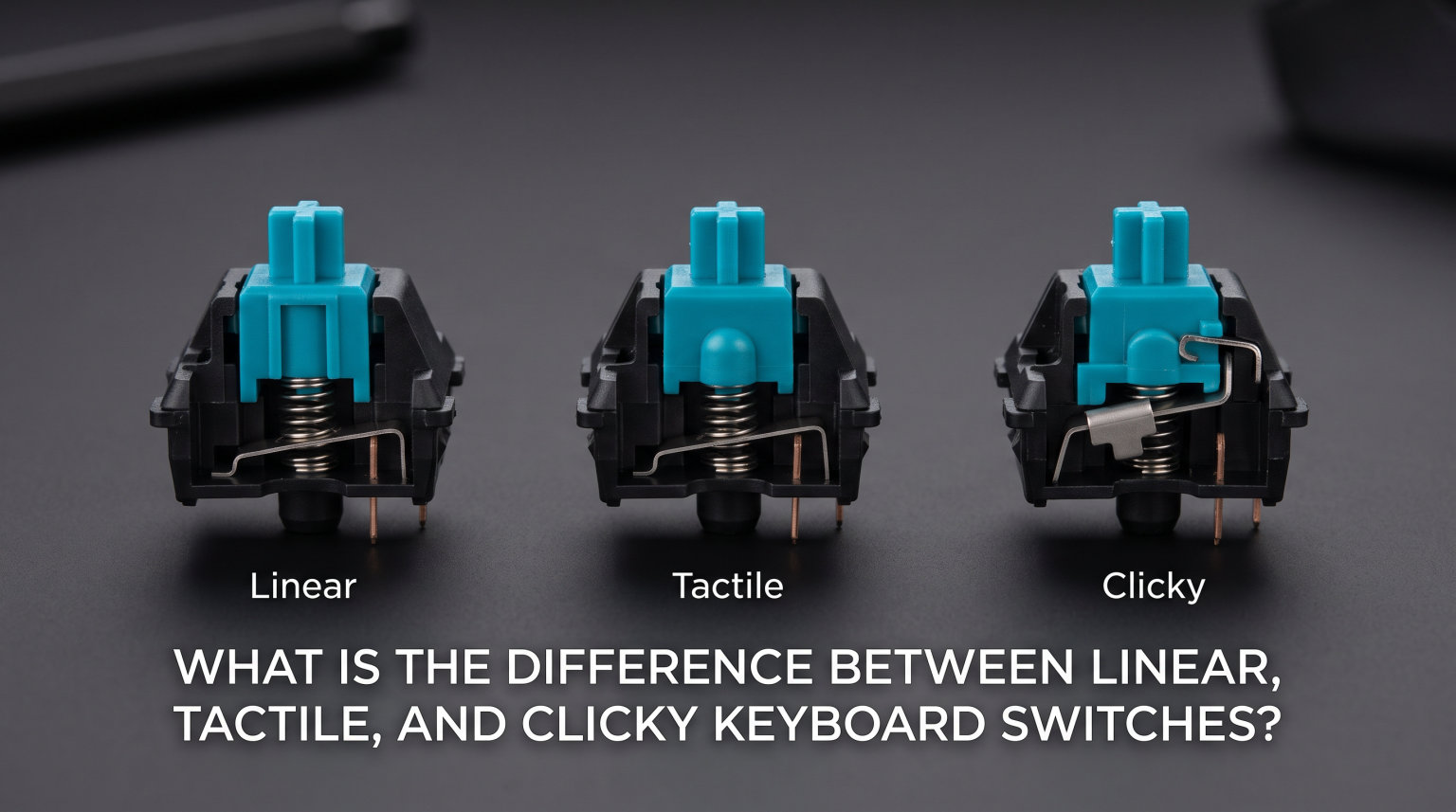
Linear, tactile, and clicky switches differ in how they feel and sound when you press them. Linear switches offer a smooth keystroke with no resistance bump. Tactile switches provide a noticeable bump partway through the press. Clicky switches combine that bump with an audible click sound.
Understanding the difference between linear tactile and clicky keyboard switches matters because your switch choice affects typing comfort, gaming performance, and how much noise you make. The right switch can transform your keyboard experience, while the wrong one might leave you frustrated or annoying your coworkers.
Mechanical keyboard switches come in these three main varieties, each designed for different preferences and use cases. Whether you’re a gamer seeking speed, a typist wanting feedback, or someone who just loves the satisfying sound of a mechanical keyboard, there’s a switch type for you.
Linear Switches: Smooth and Quiet
Linear switches provide a completely smooth keystroke from top to bottom with no tactile bump or audible feedback. When you press a linear switch, it travels straight down without any resistance changes until it bottoms out. This makes linear switches the quietest option among mechanical keyboard switches.
The lack of a tactile bump means you get no physical feedback telling you when the key has registered. You won’t feel a point where the switch actuates. This forces some typists to press harder than necessary, which can lead to fatigue during long typing sessions.
Popular linear switch examples include Cherry MX Red, Cherry MX Speed Silver, and Gateron Yellow. These switches are favorites among competitive gamers because the smooth action allows for rapid repeated key presses. The consistent feel makes them predictable for fast-paced gaming scenarios.
Linear switches typically require less force to actuate compared to other switch types. Most linear switches actuate at around 45 grams of force, though variations exist. The light actuation force combined with the smooth travel makes these switches feel almost effortless to press.
The sound profile of linear switches is minimal. You’ll primarily hear the sound of the keycap hitting the keyboard frame when you bottom out. This quiet operation makes linear switches ideal for shared office spaces or late-night gaming sessions where noise might disturb others.
Many users find linear switches feel “boring” at first because they lack feedback. However, once you adapt to the smooth action, you might appreciate the consistency and speed they offer. Some enthusiasts prefer linear switches for their clean, uncluttered typing experience.
Linear Switch Pros and Cons
Linear switches excel at speed and quietness. They work great for gaming where rapid key presses matter. The smooth feel suits users who prefer consistency over feedback. They’re also the quietest option for shared environments.
The main downside is the lack of feedback. Without a tactile bump, you can’t feel when the key registers. This might cause you to bottom out harder than necessary, potentially causing finger fatigue. Some typists also find them less satisfying to use.
Tactile Switches: Balanced Feedback
Tactile switches feature a noticeable bump in the middle of the key press that provides physical feedback when the switch actuates. This bump tells you exactly when your keystroke has registered without needing to press the key all the way down. The tactile feedback helps you develop a lighter typing style over time.
The tactile bump occurs at or near the actuation point, which is where the key press registers with your computer. You’ll feel a slight resistance that suddenly gives way, similar to pressing a pen clicker. This feedback loop helps you type more efficiently because you know precisely when each key activates.
Cherry MX Brown is the most well-known tactile switch, offering a gentle bump that doesn’t interfere with typing speed. Other popular options include Gateron Brown and the slightly more tactile Cherry MX Clear. These switches strike a balance between feedback and smoothness.
The sound profile of tactile switches falls between linear and clicky switches. They’re quieter than clicky switches because they don’t have the internal mechanism that creates the loud click sound. However, they’re slightly louder than linear switches because the tactile bump can produce a subtle sound when activated.
Tactile switches help prevent bottoming out, which means pressing the key until it hits the keyboard frame. When you feel the bump, you know the key has registered, so you can release it sooner. This lighter touch reduces finger strain during long typing sessions and can improve your typing speed.
Many users consider tactile switches the best middle-ground option. They provide enough feedback to feel satisfying without the loud noise of clicky switches. This makes them suitable for both typing and gaming in various environments, from home offices to shared workspaces.
Tactile Switch Pros and Cons
Tactile switches offer satisfying feedback that helps you type with confidence. The bump prevents bottoming out, reducing finger strain. They’re quiet enough for office environments while still providing mechanical keyboard satisfaction. These switches work well for both typing and gaming.
Some users find the tactile bump too subtle, especially on switches like Cherry MX Brown. Others might prefer either complete silence or the loud click of clicky switches. The moderate feedback won’t satisfy users who want extreme options in either direction.
Clicky Switches: Loud and Satisfying
Clicky switches combine a tactile bump with an audible click sound that occurs when the key actuates. The click provides both physical and auditory feedback, making these switches the most distinct and satisfying option for many enthusiasts. You hear and feel exactly when each keystroke registers.
The clicky mechanism uses a specially designed internal component that snaps during actuation, producing the characteristic clicking sound. This isn’t just the sound of the keycap hitting the frame—it’s an intentional design feature. Popular examples include Cherry MX Blue, Kailh Box Jade, and Gateron Blue.
Clicky switches are polarizing in the mechanical keyboard community. Some users absolutely love the tactile and auditory satisfaction, while others find the noise unbearable. The loud click can reach 60-70 decibels or more, comparable to a conversation or background music volume.
The sound makes clicky switches unsuitable for shared office spaces or environments where others might be disturbed. Many clicky switch users report that coworkers, family members, or roommates complain about the constant clicking. Even using voice chat or Discord while typing on clicky switches can interfere with communication.
Despite the noise concerns, clicky switches offer the most feedback of any switch type. The combination of tactile bump and audible click creates a satisfying typing experience that many users find enjoyable. The feedback can actually improve typing accuracy because you receive clear confirmation of each keystroke.
Some enthusiasts who try other switch types eventually cycle back to clicky switches. They miss the satisfying feedback and end up returning to the loud but rewarding typing experience. Clicky switches have a dedicated following among mechanical keyboard enthusiasts.
Clicky Switch Pros and Cons
Clicky switches provide maximum feedback with both tactile and auditory confirmation. Many users find them deeply satisfying for typing. The clear feedback can improve typing accuracy and confidence. They’re ideal for personal use in noise-friendly environments.
The loud noise is the biggest drawback. Clicky switches disturb others in shared spaces. They can interfere with voice chat during gaming. The noise might also bother you over time during extended use. These switches are rarely recommended for office environments.
Switch Type Comparison Table
| Feature | Linear | Tactile | Clicky |
|---|---|---|---|
| Feel | Smooth, no bump | Noticeable bump | Bump with click |
| Sound | Quiet | Moderate | Loud |
| Feedback | None | Tactile bump | Tactile + Auditory |
| Actuation Force | Light (45g typical) | Medium (50-55g) | Medium-Heavy (50-60g) |
| Best For | Gaming, quiet offices | Typing, all-around use | Personal use, enthusiasts |
| Examples | Cherry MX Red, Gateron Yellow | Cherry MX Brown, Gateron Brown | Cherry MX Blue, Kailh Box Jade |
This comparison highlights the key differences between linear, tactile, and clicky switches. Your choice depends on what you value most: speed, feedback, quietness, or satisfaction.
Linear vs Tactile Switches
When comparing linear and tactile switches, the main difference comes down to feedback. Linear switches offer a smooth, consistent press with no resistance changes. Tactile switches add a bump that tells you when the key has registered. This single difference affects everything from typing speed to finger fatigue.
For gaming, linear switches often have the advantage. The smooth action allows for faster repeated key presses because there’s no bump to overcome. Competitive gamers who need to spam keys quickly often prefer linear switches for this reason. The lack of resistance also means less finger fatigue during long gaming sessions.
For typing, tactile switches usually win. The feedback helps you develop a lighter touch because you know exactly when the key activates. This prevents the hard bottoming out that linear switches encourage. Many typists find tactile switches more satisfying and less fatiguing over long writing sessions.
The sound difference between linear and tactile switches is minimal. Both are quiet enough for office environments. Linear switches are slightly quieter because there’s no bump mechanism, but the difference isn’t dramatic. If noise is your primary concern, both options work well in shared spaces.
Some users find linear switches feel “empty” because they provide no feedback. You press the key and feel nothing until it hits the bottom. Tactile switches solve this by giving you a clear signal during each keystroke. If you’re coming from membrane keyboards, tactile switches might feel more familiar and satisfying.
Ultimately, the choice between linear and tactile depends on your priorities. Choose linear for pure speed and gaming. Choose tactile for typing comfort and feedback. Both are excellent choices that will serve you well for years.
Tactile vs Clicky Switches
Tactile and clicky switches both provide tactile feedback through a bump in the keystroke, but clicky switches add an audible click sound. This sound comes from an internal mechanism that creates a distinct clicking noise when the switch actuates. The result is the most feedback-heavy option among keyboard switches.
The feedback difference is significant. Tactile switches give you one signal—a physical bump. Clicky switches give you two signals—a bump plus a click. This dual feedback can make typing feel more engaging and satisfying. Many users report that clicky switches help them type more accurately because they receive clearer confirmation of each keystroke.
Sound is the biggest differentiator between these two switch types. Tactile switches are quiet enough for offices and shared spaces. Clicky switches are notably loud and can disturb others nearby. If you work in an office, use voice chat frequently, or share your living space, clicky switches might cause problems.
The clicky mechanism can make these switches feel slightly different from tactile ones during use. The click adds a small amount of resistance and changes the overall feel. Some enthusiasts prefer this extra complexity, while others find it distracting or unnecessary.
Interestingly, the gaming performance difference between tactile and clicky switches is negligible for most users. While some claim clicky switches are too slow for competitive gaming, the actual impact on performance is minimal. Your choice should come down to sound preference and feedback satisfaction rather than gaming capability.
For daily typing and general use, tactile switches are the safer choice. They provide satisfying feedback without the noise complaints. But if you work alone and love the mechanical keyboard experience, clicky switches offer the most engaging typing feel available.
Linear vs Clicky Switches
Linear and clicky switches represent opposite ends of the feedback spectrum. Linear switches give you nothing but smooth, quiet travel. Clicky switches give you everything—tactile bump and audible click. Understanding this contrast helps you decide which experience matches your preferences.
For gamers who want maximum speed, linear switches have the edge. No bump means no resistance to overcome when spamming keys. No click means no distraction or interference with voice chat. The smooth action feels almost effortless, which helps during long gaming sessions where quick reflexes matter.
Clicky switches offer a completely different experience. Each keystroke feels deliberate and satisfying. The combination of bump and click creates a rhythm that many typists find enjoyable. Some users report that clicky switches make typing feel more like a musical instrument than a task.
The sound difference is dramatic. Linear switches are quiet enough for any environment. Clicky switches are loud enough to be heard in other rooms. This makes the choice straightforward if you share your space. Linear wins for shared environments, clicky for personal spaces where noise isn’t an issue.
Beyond sound, the typing experience differs significantly. Linear switches feel clean and consistent but provide no confirmation that keys have registered. Clicky switches feel busy and satisfying but might feel overwhelming if you prefer simplicity. Your preference depends on whether you value minimalism or maximum feedback.
Some users switch between these types based on their activity. Linear switches for gaming sessions, clicky switches for typing documents. Hot-swap keyboards make this easy by allowing switch changes without soldering. You don’t have to commit to just one switch type if you want variety.
Which Switch Type Should You Choose?
Best Switches for Gaming
Linear switches are the most popular choice for competitive gaming. The smooth keystroke allows for rapid key presses without resistance. Games that require quick reflexes and repeated button presses benefit from the consistent feel. Popular linear switches like Cherry MX Red and Gateron Yellow dominate the gaming scene.
That said, many pro gamers use tactile switches successfully. The difference between linear and tactile for gaming performance is minimal for most players. If you also do significant typing, tactile switches might serve you better overall. The bump won’t significantly impact your gaming abilities.
Clicky switches work for gaming but have downsides. The loud click can interfere with voice chat and disturb others. Some gamers find the extra feedback distracting during fast-paced gameplay. However, if you game alone and love the sound, clicky switches can still provide an enjoyable experience.
Best Switches for Typing and Office Work
Tactile switches win for typing and office work. The feedback bump helps you type efficiently without bottoming out hard. They’re quiet enough for shared spaces while still providing mechanical keyboard satisfaction. Cherry MX Brown and similar tactile switches are favorites among office workers and typists.
Linear switches work well for typing if you prefer minimalism. They’re the quietest option, which is ideal for noise-sensitive environments. However, the lack of feedback might cause you to press harder than necessary. Some typists adapt to this, while others find it unsatisfying.
Avoid clicky switches for office work. The loud noise will disturb coworkers and can create tension in shared spaces. Many offices have policies against clicky mechanical keyboards for this reason. Save the clicky switches for your home setup where you have privacy.
Best Switches for Programming
Programmers often prefer tactile switches for coding. The feedback helps during long typing sessions, and the moderate sound level works for office environments. Many developers spend hours at their keyboards, so the reduced finger fatigue from tactile feedback matters.
Linear switches also work well for programming if you type lightly. The quiet operation won’t disturb others during pair programming sessions or in open office layouts. Some programmers appreciate the clean, consistent feel for the repetitive nature of coding.
Clicky switches can work for programming at home, but consider your environment carefully. If you work remotely and have your own space, clicky switches might enhance your typing experience. Just be aware that the sound carries and might bother household members.
Best Switches for Beginners
If you’re new to mechanical keyboards, start with tactile switches like Cherry MX Brown. They provide the classic mechanical keyboard experience without extreme characteristics. You’ll feel the satisfying bump and get moderate sound levels. This helps you understand what you prefer.
From there, you can explore other options. If you want more feedback and don’t mind noise, try clicky switches. If you want pure speed and quietness, try linear switches. Many keyboard enthusiasts recommend trying multiple switch types to discover your preference.
Hot-swap keyboards make experimentation easy. These allow you to change switches without soldering, so you can test different types on the same keyboard. This flexibility helps beginners find their ideal switch without committing to a full keyboard purchase.
Frequently Asked Questions
Should I get linear or clicky switches?
Choose linear switches if you need quiet operation for shared spaces or want maximum speed for gaming. Choose clicky switches if you work alone, love auditory feedback, and want the most satisfying typing experience. Linear is the safer choice for most users, while clicky suits enthusiasts who prioritize feedback over noise considerations.
Do pro gamers use linear or tactile?
Most pro gamers use linear switches because the smooth keystroke allows faster repeated key presses. However, many competitive players successfully use tactile switches. The performance difference is negligible for most skill levels. Your comfort and preference matter more than the theoretical speed advantage.
Why do people hate linear switches?
Some users dislike linear switches because they lack feedback. The smooth keystroke provides no indication when the key has registered, which can feel unsatisfying. This forces typists to bottom out harder, potentially causing finger fatigue. Users who prefer tactile confirmation often find linear switches feel empty or boring.
Does anyone actually like clicky switches?
Yes, clicky switches have a dedicated following among mechanical keyboard enthusiasts. Many users find the combined tactile and auditory feedback deeply satisfying for typing. Some enthusiasts even cycle back to clicky switches after trying other types because they miss the engaging feedback. Clicky switches remain popular despite noise concerns because they offer the most distinct mechanical keyboard experience.
Conclusion
The difference between linear tactile and clicky keyboard switches comes down to feedback and sound. Linear switches are smooth and quiet with no bump. Tactile switches add a bump for physical feedback. Clicky switches combine that bump with an audible click for maximum confirmation.
Your ideal switch depends on your environment and preferences. Linear works best for gaming and quiet offices. Tactile suits typists who want balanced feedback. Clicky satisfies enthusiasts who love loud, engaging keyboards. Each type has its place, and trying multiple switches helps you find your perfect match.
If you’re unsure where to start, tactile switches offer the safest middle ground. They provide satisfying feedback without extreme noise. From there, you can explore linear for speed or clicky for maximum satisfaction based on your needs.